
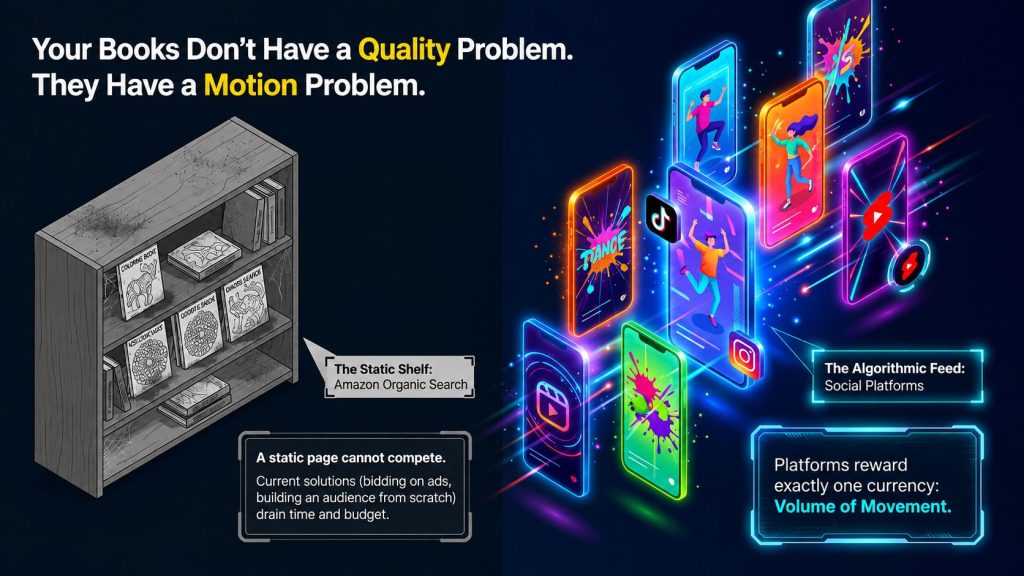
Most publishers of low-content books receive the same recommendation when their coloring or activity book fails to gain traction: invest more in advertising, or focus on building an audience first. Neither is practical for someone who simply wants their book to actually be noticed. The TubeForge Turn KDP Pages Into Scroll Stopping Videos Review approaches the issue differently rather than viewing it as a marketing challenge, TubeForge sees it as a motion problem and develops a tool designed specifically to address that single aspect.
I reviewed the complete sales page and in-app dashboard to clearly outline what TubeForge offers, what it doesn’t, and whether the $ 17 one-time fee which comes with a firm no-refund policy is a worthwhile investment before you purchase or promote it. This TubeForge Turn KDP Pages Into Scroll Stopping Videos Review goes beyond the headline claims to help you see where the software can genuinely save time and where you’ll still need to manage the marketing on your own.
Quick Summary Table
| Category | Details |
|---|---|
| Product Name | TubeForge |
| Creator | Thu Thao (novaaiplatform.com) |
| Core Function | Turns book pages into short-form “process” videos (coloring, line-trace) |
| Format | Browser-based app, no install, renders locally on your device |
| Templates Included | 3 (Marker Coloring, Rainbow Coloring, Neon Line Trace) |
| Output | 1080×1920 HD MP4, no watermark |
| Renders Included | 50 (front-end tier) |
| Price | $17, one-time payment |
| Guarantee | None — all sales are final, explicitly stated |
| Skill Level | Beginner-friendly; no filming, voice, or editing skill required |
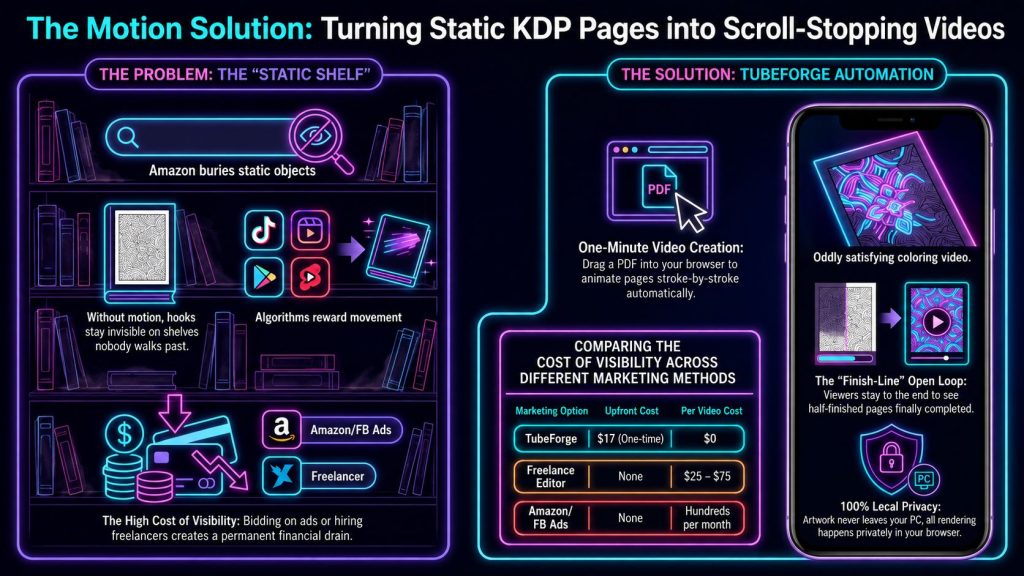
Table of Contents
What Is TubeForge?
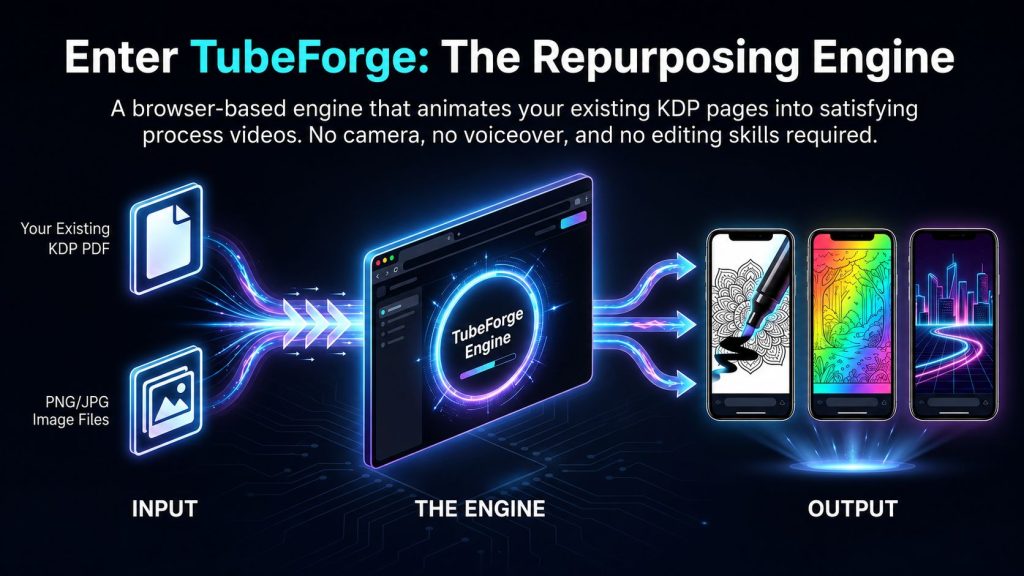
TubeForge is a web-based application designed exclusively for Amazon KDP publishers who create coloring, activity, and puzzle books. It transforms a page you’ve already createdwhether from a PDF or an imageand turns it into a brief, “ oddly satisfying” animated video: marker strokes coloring in the artwork one by one, a rainbow sweeping across the page, or a glowing neon line tracing over itall accompanied by royalty-free music and a synthesized ASMR marker sound. In this TubeForge Turn KDP Pages Into Scroll Stopping Videos Review, this method stands out for converting existing book covers into video content without needing to film, record voiceovers, or perform conventional editing.
The product’s central idea is that free platforms such as YouTube Shorts, Instagram Reels, TikTok, and Pinterest prioritize content that moves and keeps viewers engaged something a static book listing can’t deliver and that “ oddly satisfying” process videos are among the most popular because an unfinished page creates an unresolved hook that keeps viewers watching until the end. For this TubeForge Turn KDP Pages Into Scroll Stopping Videos Review, the concept is especially pertinent to publishers who already possess finished pages and are looking for a practical method to transform those assets into more engaging promotional material.
Importantly, TubeForge clearly states that it does not use AI to redraw or reinterpret your artwork. It brings to life the precise linework you’ve already designed, which the sales page presents as ensuring both quality ( no blurred details or AI mistakes) and originality ( the resulting videos count as your authentic, non-reused content rather than AI-altered material). That distinction matters in this TubeForge Turn TubeForge Turn KDP Pages Into Scroll-Stopping Videos review, as the software is marketed less as an AI art generator and more as a specialized tool for repurposing existing KDP artwork.
Who Created It?
TubeForge was developed by Thu Thao, who is explicitly identified and pictured on the sales page as the ” Maker of TubeForge” under the novaaiplatform.com brand. Direct email support is offered, serving as a reasonable indicator of transparency for a tool that handles original creative work. In this TubeForge Turn KDP Pages Into Scroll Stopping Videos Review, having a clearly identified creator and a direct support channel offers buyers some helpful reassurance, especially if they need help with the app or their rendering workflow.
How Does It Work?
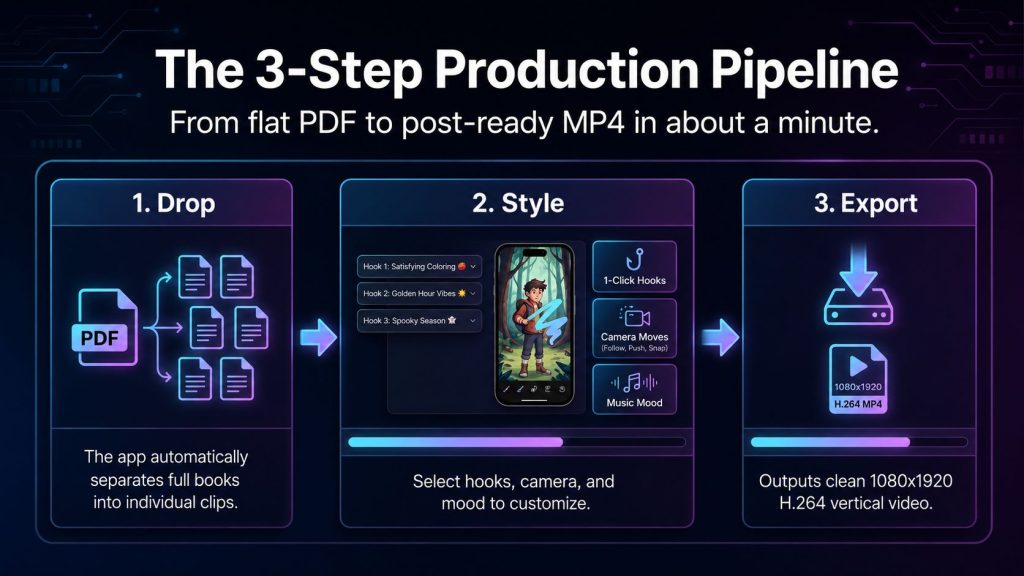
Step 1 — Drop Your Page
Upload a whole PDF (the app automatically splits it into individual pages) or standalone image files. Everything renders locally in your browser — your files are never uploaded to a server.
Step 2 — Pick a Style, Hook & Music
Choose a satisfying process template, a viral top-text hook (from 52 options across 13 niches), a camera move, and a music mood — each a single click, with no manual editing required.
Step 3 — Export & Post
Download the finished 1080×1920 HD MP4 and upload it to your platform of choice, with your book link in your bio or caption. Repeat with the next page.
What’s Inside the Front-End App
| Feature | Details |
|---|---|
| Satisfying process templates | 3: Marker Coloring, Rainbow Coloring, Neon Line Trace |
| Camera moves | 4: Follow, Wide, Slow Push-In, Snap |
| Viral hooks | 52 hooks across 13 niches |
| Pattern-interrupt opener | Optional — flashes finished art first, then rewinds to color it |
| Music & sound | 4 copyright-free music moods + synthesized ASMR marker sound |
| Import | Whole-PDF auto-split, or individual PNG/JPG images |
| Export | HD 1080×1920 MP4 (H.264), no watermark; WebM fallback |
| Rendering | 100% in-browser; files never leave your computer |
| Renders included | 50 (one page = one render) |
| Updates | All future front-end app updates included free |
Benefits
- Removes the filming, voiceover, and video-editing skill barrier entirely — no camera, no voice, no editing app needed
- Genuinely local, private rendering — since artwork never uploads to a server, there’s no wait time and no third-party server handling your original files
- One finished book can become dozens of individual, platform-ready videos from work you’ve already completed
- One-time $17 payment with no subscription, credits, or per-video fee on the front-end tier
- Built-in, render-time-generated copyright-free audio avoids licensing and copyright-strike risk entirely
Pros and Cons
| Pros | Cons |
|---|---|
| No filming, voice, or editing skills required | Strict no-refund policy — all sales are final |
| Fully local/private rendering, no file uploads | 50-render cap on the front-end tier, not unlimited |
| One-time $17 price, no subscription | One video per page, not one video per whole PDF (by design) |
| Doesn’t use AI to redraw or alter your artwork | Overlap between Unlimited and Activity Pack upsells needs clarification |
| Built-in copyright-free music generated at render time | No guarantee of views, sales, or income (disclosed clearly, but worth noting) |
Who Should Buy It?
- Amazon KDP publishers of coloring, activity, or puzzle books who want free social traffic instead of paid ads
- Faceless content creators who don’t want to appear on camera or use their voice
- Publishers sitting on already-published books getting no visibility, who want to repurpose existing pages into short-form content
- Anyone comparing this to freelance video editing costs ($25–$75 per clip) or ongoing editor-app subscriptions
Who Should Avoid It?
- Anyone expecting guaranteed views, sales, or income — the sales page is explicit and repeated that no honest tool can promise this
- Publishers who want the app to auto-post or manage their social accounts — TubeForge renders videos only; posting remains manual
- Anyone without existing coloring, activity, or puzzle book pages to use as source material
- Buyers uncomfortable committing to a purchase with absolutely no refund option under any circumstance
Pricing Breakdown — The Render System Explained
The front end is listed at $17, a one-time payment including:
- The full TubeForge app (browser-based, no install)
- 3 process templates + 4 camera moves
- 52 viral hooks, copyright-free music, and ASMR sound
- Whole-PDF import with automatic page-splitting
- HD 1080×1920 MP4 export, no watermark
- 50 video renders (one page = one render — a 25-page book uses 25 renders)
- All future front-end app updates, free
Note that the 50 renders are a one-time allotment, not a monthly refresh — a publisher with several multi-page books will use these up relatively quickly. This is the main reason to weigh the Unlimited upgrade if you plan to promote more than one or two books.
OTO Breakdown
| Product | Price |
|---|---|
| Front End — TubeForge | $17.00 |
| TubeForge Unlimited | $47.00 |
| TubeForge Activity Pack | $67.00 |
| TubeForge Bulk Studio | $97.00 |
🎁 Bonuses Just For You
1. DFY Social
Get ready-made social media content, graphics, and posting ideas that help you promote your business consistently without spending hours creating posts from scratch.
2. Quantum AI
Discover AI-powered tools and workflows that can speed up content creation, marketing tasks, and business automation while saving valuable time.
3. Anonymous AI
Learn how to build and grow an online business using AI without showing your face, making it ideal for creators who prefer to stay behind the scenes.
4. Video Marketing Profits
Master simple video marketing strategies to increase traffic, engage your audience, and generate more sales across platforms like YouTube and social media.
5. High Ticket AI
Explore AI-assisted methods for promoting premium products and services, helping you target higher-value customers and maximize your earning potential.
6. Traffic Funnel Blueprint
Follow a proven step-by-step funnel strategy to attract visitors, capture leads, and convert them into paying customers with greater efficiency.
Per the WarriorPlus affiliate offer and direct references within the app and sales page:
- TubeForge Unlimited ($47): Confirmed directly in the app’s own upgrade menu as “Unlimited renders + the Activity Pack (Color by Number & Jigsaw templates)” — meaning this single upgrade appears to include both unlimited rendering capacity and the 2 extra templates otherwise sold separately.
- TubeForge Activity Pack ($67): Referenced on the sales page as adding 2 more templates — Color by Number and Jigsaw Reveal — beyond the 3 included in the front end.
- TubeForge Bulk Studio ($97): Referenced directly in the FAQ as a way to queue an entire book and walk away while the app renders and saves every page automatically, instead of manually clicking Render once per page.
Important pricing discrepancy to confirm: The in-app description for ” Unlimited” states it includes Activity Pack templates, but Unlimited is priced at $47, whereas the Activity Pack alone costs $67 on WarriorPlus. This results in an unusual pricing discrepancy that needs to be addressed directly with the vendor or confirmed via the live checkout process before drafting specific sales copy for upsell. As currently described, a buyer would have little incentive to purchase the Activity Pack separately, since Unlimited seems to offer the same templates plus unlimited renders at a lower cost. This is a key point to emphasize in the TubeForge Turn KDP Pages Into Scroll Stopping Videos Review, especially for buyers evaluating the different upgrade options.
The 30-Day Refund Policy — What You Need to Know
This needs to be stated clearly, not avoided: TubeForge offers a 30-day refund policy. Buyers have 30 days from the purchase date to assess the software and determine if it suits their requirements. If it doesn’t provide the expected value, eligible customers may request a refund within the 30-day window, provided they comply with the vendor’s stated terms. For anyone reviewing the TubeForge Turn KDP Pages Into Scroll Stopping Videos Review, this 30-day period offers extra time to test the platform before committing to a decision.
The 30-day guarantee gives buyers considerably more flexibility than a strict no-refund offer. Instead of having to make an immediate decision without a safety net, you have time to explore the app, test its rendering features, and determine whether it fits your KDP content workflow. In this TubeForge Turn KDP Pages Into Scroll Stopping Videos Review, that refund window is an important factor to consider when evaluating the overall value and purchase risk.
Real Use Case Examples
Based on the workflow and audience described directly on the sales page:
- A KDP publisher with a 25-page coloring book uploads the full PDF, applies the Marker Coloring template with a matching viral hook, and renders all 25 pages as individual Shorts over an afternoon — using their entire front-end render allotment on one book. This is one practical use case highlighted in the TubeForge Turn KDP Pages Into Scroll Stopping Videos Review.
- A faceless content creator who doesn’t want to be on camera builds a month of daily TikTok posts from a single 30-page activity book, spacing out the posts rather than uploading all at once. The TubeForge Turn KDP Pages Into Scroll Stopping Videos Review shows how this can help turn existing book pages into a consistent content pipeline.
- A publisher comparing costs skips hiring a freelancer (at $25–$75 per video) and instead renders dozens of videos from their existing catalog at $0 marginal cost per video within their render allotment, a cost-saving angle worth considering in the TubeForge Turn KDP Pages Into Scroll Stopping Videos Review.
- A publisher with several books purchases the Unlimited upgrade to avoid running out of renders partway through promoting their full catalog, making the upgrade an important consideration in the TubeForge Turn KDP Pages Into Scroll Stopping Videos Review.
TubeForge vs. Alternatives
| Factor | CapCut / Canva Pro |
|---|---|
| Cost per Video | Included in subscription, but time-intensive |
| Filming/Voice Required | No, but manual editing required |
| Rendering Location | Cloud-based |
| AI Redraws Your Art | N/A |
| Pricing Model | $8–$13/month subscription |
| Refund Policy | Standard subscription terms |
Frequently Asked Questions – TubeForge Turn KDP Pages Into Scroll Stopping Videos Review
1. What exactly is TubeForge?
It’s a browser-based app that turns pages from coloring, activity, and puzzle books into short, satisfying process videos — set to music and animation — formatted for platforms like YouTube Shorts, Reels, TikTok, and Pinterest.
2. Do I need to install anything?
No. TubeForge runs entirely in your web browser, with nothing to download or set up.
3. Do I need design or video-editing skills?
No. You drag in a page and select a few preset options; the app handles animation, timing, sound, and export automatically.
4. Is this AI that changes my artwork?
No. TubeForge animates your exact linework as drawn — it does not redraw or reinterpret your art in any way.
5. Where does the music come from — is it really copyright-free?
The music isn’t licensed from an external source; it’s synthesized by the app itself at render time using built-in chord progressions and melodies, meaning there’s no rights holder, no license to track, and nothing to clear. You can also upload your own track if you prefer, in which case you’re responsible for its rights.
6. Is it a one-time payment or a subscription?
One-time. The $17 front-end price includes no monthly fee, credits, or “Pro” paywall on the core app.
7. How many videos can I make?
50 renders are included on the front-end tier — one page equals one video render, so a 25-page book uses 25 renders. An Unlimited upgrade removes this cap.
8. If I upload a 30-page PDF, do I get one long video?
No — by design, you get one video per page, since a single long clip isn’t postable as a Short. A 30-page book requires 30 individual render/download actions on the front-end tier (the Bulk Studio upgrade automates this queuing process).
9. What’s the refund policy?
There isn’t one. The sales page states plainly that all sales are final, since account access and render capability are granted the moment payment is made.
10. Will this guarantee me views, sales, or income?
No, and the sales page is explicit about this multiple times — TubeForge is a video-creation tool, not a marketing or income guarantee, and results depend entirely on the publisher’s own book, niche, and posting consistency.