
If you’ve ever spent forty-five minutes on a thumbnail for a ten-minute video, you already know why this Thumbium review exists. Thumbnails are the single biggest lever most YouTube creators underinvest in, mostly because the tools for making them well are either too slow, too expensive, or too locked into a monthly subscription that keeps billing whether you upload once a week or once a month. This Thumbium review looks at whether a new AI-powered thumbnail generator from veteran YouTube marketer Chris Derenberger actually solves that problem, or whether it’s another launch that looks good on the sales page and thins out once you’re inside the app.
🔥 Thumbium Review — At a Glance
A quick overview of everything you need to know before buying Thumbium, including pricing, AI model, thumbnail formats, and launch guarantee.
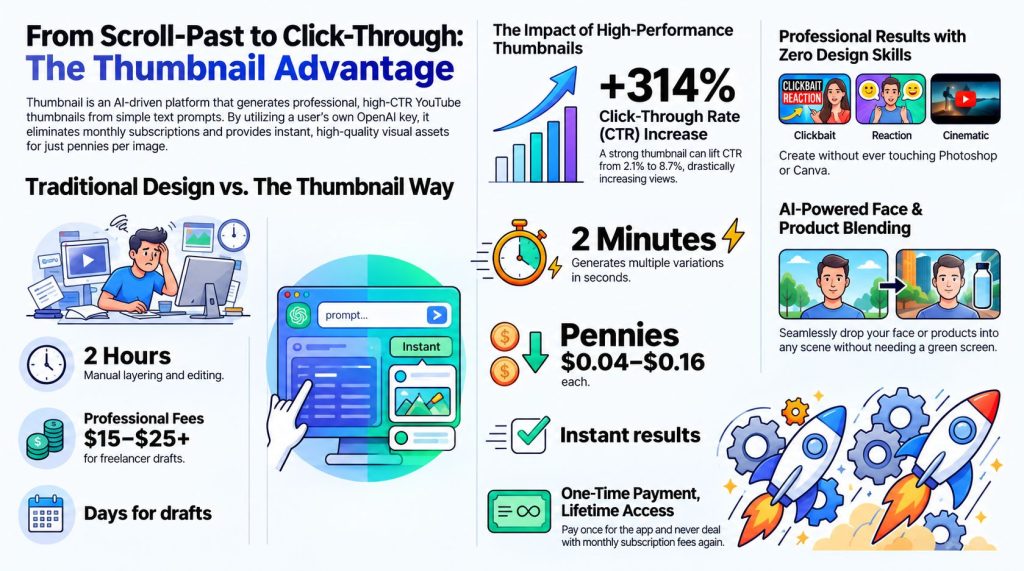
Thumbium is a one-time-purchase AI thumbnail generator that connects to your own OpenAI API key instead of billing you a recurring subscription. It builds 16:9 YouTube thumbnails and 9:16 Shorts thumbnails from a text prompt or a reference photo, generates up to four variations per request, and folds in background removal and scene composition so you’re not fighting layers in Photoshop. The front end is priced in three tiers ($17, $29, $49) based on monthly thumbnail allowance, with three optional upgrades for creators who want bulk remixing, AI-written titles and descriptions, or a client-facing approval workflow.
🚀 Why Choose Thumbium?
Thumbium is a one-time-purchase AI thumbnail generator that connects directly to your own OpenAI API key instead of locking you into an expensive monthly subscription.
Create eye-catching 16:9 YouTube thumbnails and 9:16 YouTube Shorts thumbnails from a simple text prompt or reference image. The AI generates up to four professional thumbnail variations while automatically handling background removal, scene composition, and visual styling—so you can skip complicated Photoshop editing.
Thumbium is available in three affordable pricing tiers ($17, $29, and $49) based on your monthly thumbnail needs. Optional upgrades unlock bulk thumbnail remixing, AI-generated titles & descriptions, and a client approval workflow for freelancers and agencies.
✅ One-Time Payment | ⚡ Instant Access | 💰 30-Day Money-Back Guarantee
Table of Contents
What Is Thumbium, Exactly?
Thumbium is a browser-based AI thumbnail generator built specifically around the YouTube publishing workflow. Instead of opening a blank Photoshop canvas or wrestling with a generic AI image tool that doesn’t understand YouTube’s dimensions or conventions, you describe what you want in plain language, optionally attach a reference photo of yourself or a product, and the system generates a finished thumbnail sized correctly for either standard video (16:9) or Shorts (9:16).
The detail that separates this Thumbium review from most others in the crowded AI-thumbnail space is the billing model. Thumbium doesn’t charge you a monthly subscription for the software itself. You make one purchase, connect your own OpenAI API key, and pay OpenAI directly for the small per-image usage fee each time you generate a thumbnail. That’s a meaningfully different cost structure than tools that lock you into a flat monthly fee regardless of how many thumbnails you actually produce.
Whether that model works better for you depends entirely on your publishing volume. A creator who uploads three times a week and needs four thumbnail variations per upload will use their OpenAI credits differently than someone posting twice a month. That’s worth sitting with before you buy, and it’s a theme we’ll come back to throughout this Thumbium review.
Before going further, it’s worth pausing on something that trips up a lot of people searching for a Thumbium review: the AI thumbnail space is crowded with similarly named tools. Thumbium is a different product from Thumble, ThumblifyAI, Thumbly, Thumio, and Thumbmagic — all of which are separate thumbnail-generation tools with their own pricing, features, and vendors. If you landed here after seeing one of those names elsewhere, double check you’re looking at the right product before you buy, since the naming overlap in this niche is genuinely confusing and easy to mix up when you’re skimming search results quickly.

How Thumbium Compares to the Manual Workflow You’re Probably Using Now
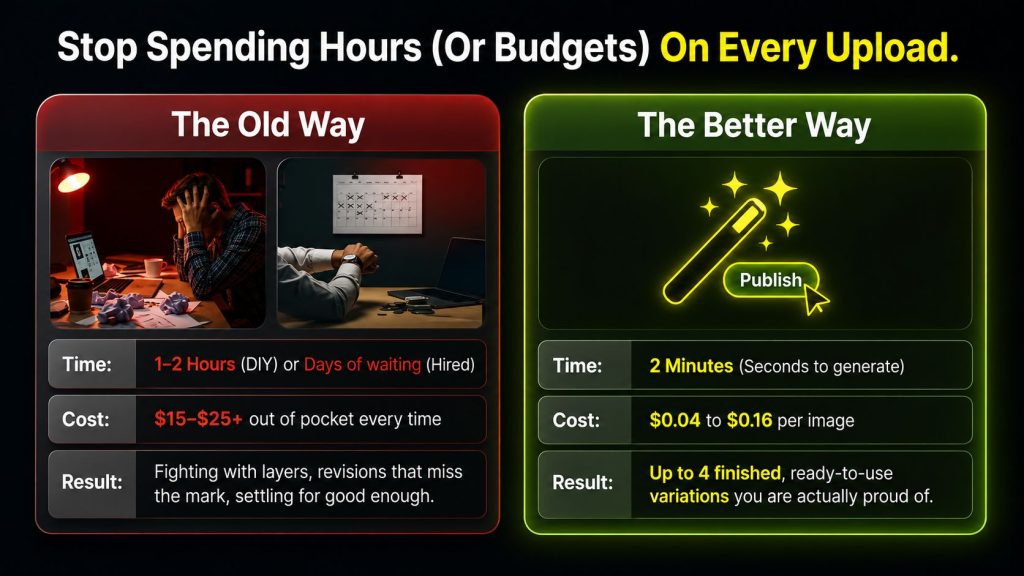
It’s worth putting a number on the problem before this Thumbium review goes any further into features. A typical manual thumbnail — pulling a still frame or a selfie, cutting yourself out of the background, placing yourself into a new scene, adding bold overlay text, adjusting contrast so the image still reads clearly at a small size on a phone screen, then exporting in the right dimensions — realistically takes anywhere from twenty minutes to an hour, depending on your comfort level with Photoshop or Canva. If you publish three times a week, that’s somewhere between one and three hours a week spent entirely on a single static image, not the video itself.
Multiply that across a year and the number gets uncomfortable fast — fifty to a hundred and fifty hours, depending on your pace, spent on thumbnails alone. That’s the backdrop this Thumbium review is measuring the tool against. Even if Thumbium only gets you from forty-five minutes down to five or ten per thumbnail, and even accounting for the learning curve of a new tool, the math works out in favor of the software fairly quickly for anyone publishing on a real schedule.
There’s also a workflow-fit question that doesn’t get enough attention in most reviews of this type. If you’re a creator who already has a fast, muscle-memory Photoshop process and genuinely enjoys the design side of things, the time savings from Thumbium matter less to you than they would to someone who dreads opening a design tool every single upload. This Thumbium review isn’t trying to talk every reader into buying — it’s trying to help you figure out which camp you’re actually in before you spend the $17.
✅ One-Time Payment | ⚡ Instant Access | 💰 30-Day Money-Back Guarantee
Who’s Behind Thumbium?
Thumbium comes from Chris Derenberger, a YouTube marketer who has been building an audience and releasing digital products since 2013. He runs VIDSociety, a YouTube ranking agency, and has released a string of prior tools in the marketing and creator space, including YT Influencer, AIWiseMind, PLR Wealth, DFY Bonus Suite, eBook Writer AI, and AI Affiliate Suite. That’s relevant to this Thumbium review because vendor track record is one of the more reliable signals you have when a product is this new — there’s no large body of buyer feedback yet, so the creator’s history of shipping and supporting products becomes a stand-in for that missing data.
According to third-party reporting on the vendor’s public WarriorPlus profile, Derenberger has racked up close to 30,000 total sales across his catalog, with several individual releases crossing the 2,000, 3,000, and 5,000-sale marks. We haven’t independently pulled these figures ourselves from a live vendor dashboard, so treat them as reported rather than confirmed — but directionally, they point to someone who has shipped repeatedly in this exact niche rather than a one-off launch account.
Thumbium’s Core Features
Here’s what you’re actually getting inside the app, broken down feature by feature so this Thumbium review gives you something more useful than a list of buzzwords.
- Prompt-to-thumbnail generation. Describe the scene in natural language — no prompt-engineering skill required — and the system handles composition, lighting, and layout.
- Style, type, and layout presets. Choose a direction like high-energy “clickbait,” a cleaner professional look, or a reaction-face style, and the system applies the visual conventions that tend to go with each.
- Dual format output. Generates correctly sized 16:9 thumbnails for standard uploads and 9:16 for Shorts from the same workflow, so you’re not manually cropping or resizing afterward.
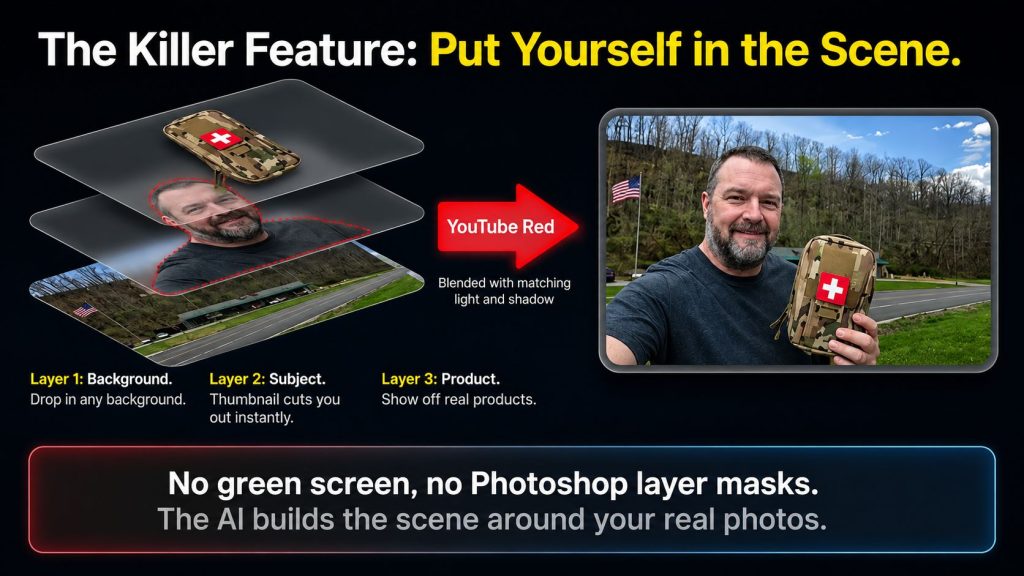
- Reference photo support. Upload a selfie or a product image and the tool extracts the subject and places it into a new scene while trying to keep lighting and perspective consistent.
- Up to four variations per generation. You get a small batch of options to compare rather than a single result you’re stuck with.
- Bring-your-own API key billing. You connect your own OpenAI key and pay usage-based costs directly to OpenAI, rather than a markup baked into a subscription.
- Automatic background removal and scene composition. The manual Photoshop layer work that normally eats up the most time is handled by the AI.
- Mix-and-match combinations. Combine a person, a product, and a background that would be difficult or impossible to physically stage and photograph.
Taken together, these features point at one specific job rather than a scattered toolkit — get a finished, on-brand, correctly sized thumbnail out the door quickly, repeatedly, without opening a heavier design tool. That focus is arguably the most defensible part of this Thumbium review’s positive take: Thumbium isn’t trying to be a general AI image generator that also happens to make thumbnails. It’s built around the specific constraints of the YouTube publishing workflow.
How Thumbium Works, Step by Step
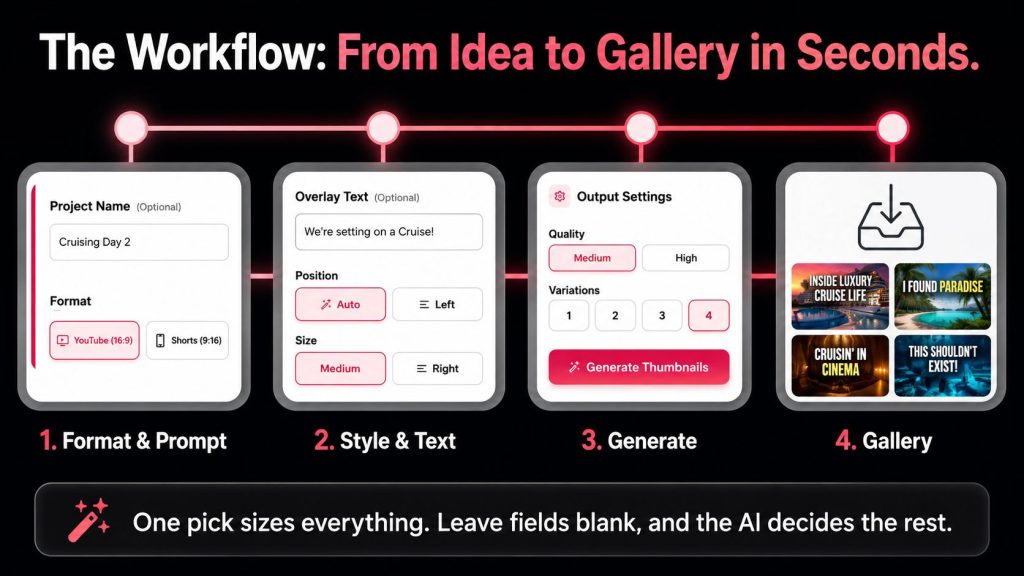
Based on the workflow described for the app, generating a thumbnail runs through six steps:
- Name your project and choose your format — standard 16:9 or vertical 9:16 for Shorts.
- Add up to three optional reference photos (subject, product, background) and describe what you want changed or kept, in plain language.
- Set your overlay text, placement, and size, with the option to reference an existing style for font and color matching.
- Choose an art style (Clickbait, Clean, Reaction, or similar) and an image type (Photoreal, Cartoon, Anime, 3D, or Auto).
- Pick image quality and how many variations to generate — up to four — and review the estimated cost before you commit to generating.
- Pull finished thumbnails from your gallery, where you can filter by format, search by project name, and download, rename, or delete individual results.
The step where you see estimated cost before generating is a small but meaningful detail for a bring-your-own-API-key tool — it removes the anxiety of an unexpected bill after the fact, which is one of the more common complaints about usage-based AI tools generally.
Thumbium Funnel Breakdown: Pricing, Tiers, and Every Upsell
Every Thumbium review should be upfront about the full funnel, because the front-end price is rarely the whole story on a WarriorPlus launch. Here’s the complete structure, cross-checked against the live affiliate dashboard:
| Product | Price | What You Get |
|---|---|---|
| Thumbium Hobby (Front End) | $17 | Up to 50 thumbnails/month — best for creators publishing a few videos monthly |
| Thumbium Business (Front End) | $29 | Up to 100 thumbnails/month — for regular uploaders who want more room to test variations |
| Thumbium Agency (Front End) | $49 | Up to 250 thumbnails/month — built for agencies or multi-channel operators |
| OTO 1: Remixer | $27 | Takes one thumbnail and generates up to 10 new variations (colors, layout, expression, headline) |
| OTO 2: Copywriter | $29 | Analyzes a thumbnail and generates 10 title ideas, a description, and tags |
| OTO 3: Client Review | $37 | Private client approval links plus full commercial rights for freelancers/agencies |
A few things worth calling out for this part of the Thumbium review. First, Hobby, Business, and Agency aren’t a front-end-plus-upsell staircase in the traditional sense — they’re three parallel tiers of the same core product, and you pick the one that matches your monthly output rather than being funneled through all three. Second, the three genuine OTOs (Remixer, Copywriter, Client Review) are each optional and none of them are required to get real use out of the core app. Third, according to third-party reporting, monthly allowances stack if you own multiple tiers under the same email — so owning both Hobby and Business reportedly gives you 150 thumbnails a month combined, rather than forcing you to choose one ceiling permanently.
We were not able to independently confirm the refund window, credit-stacking mechanics, or the 30-day thumbnail storage window directly against the live thumbium.com sales page, since the page is JS-rendered and didn’t return body content on fetch. Everything in this section is reported by a third party and should be re-verified before this Thumbium review goes live.
✅ One-Time Payment | ⚡ Instant Access | 💰 30-Day Money-Back Guarantee
Addressing the Obvious Objection: It’s a Brand-New Launch
Any Thumbium review published this early has to sit with an honest limitation: there simply hasn’t been enough time for a real body of buyer feedback to accumulate. Three days after launch, most of what’s circulating is either the vendor’s own sales copy or early affiliate coverage written from the same source material rather than from weeks of hands-on use. We think that’s worth naming directly rather than dressing this Thumbium review up as more conclusive than it actually is.
That said, “new launch” isn’t automatically a red flag, and it shouldn’t be treated as one by default. The relevant question isn’t how old the product is — it’s how much risk you’re actually carrying if it underperforms. A reported 14-day money-back guarantee, if confirmed on the live sales page, meaningfully lowers that risk, since it gives you a real window to test the workflow against your own footage and reference photos before the purchase becomes final.
Pros and Cons
- Correctly sized output for both standard 16:9 YouTube videos and 9:16 Shorts.
- Reference-photo support for placing yourself or a product into a brand-new scene.
- Generate up to four thumbnail variations for quick A/B testing.
- One-time software purchase with no recurring subscription.
- Transparent, usage-based AI costs using your own OpenAI API key.
- Automatic background removal and scene composition save editing time.
- Three pricing tiers designed for different publishing volumes.
- Requires your own OpenAI API key, adding one extra setup step.
- Monthly thumbnail limits depend on the plan you purchase.
- Built specifically for thumbnails—not a complete graphic design suite.
- Still a relatively new product, so long-term reliability is yet to be proven.
- Some pricing and policy details should be confirmed against the live sales page before purchasing.
Buy It If / Think Twice If
- Correctly sized output for both 16:9 YouTube videos and 9:16 Shorts.
- Reference-photo support for placing yourself or a product into a new scene.
- Generate up to four thumbnail variations for quick A/B testing.
- One-time software purchase with no recurring subscription.
- Transparent AI costs using your own OpenAI API key.
- Automatic background removal and scene composition save valuable editing time.
- Three pricing tiers designed for creators with different publishing volumes.
- Requires your own OpenAI API key, adding one extra setup step.
- Monthly thumbnail limits depend on the plan you choose.
- Designed specifically for thumbnails—not a complete graphic design suite.
- As a newer product, long-term reliability is still being established.
- Always verify current pricing and policies on the official sales page before purchasing.
Who Actually Benefits From Thumbium?
This Thumbium review would be incomplete without being honest about fit, since no tool is right for everyone. The people most likely to get their money’s worth are YouTubers and Shorts creators who upload on a real schedule and feel thumbnail creation dragging on their production time. Affiliate and digital marketers who publish promotional videos regularly are another good fit, since consistent, on-brand visuals matter for recognition.
On the other end, if you upload occasionally and don’t feel thumbnail creation as a real bottleneck, or if you genuinely enjoy the manual design process in Photoshop or Canva and aren’t looking to hand that off, this Thumbium review would be doing you a disservice by pretending Thumbium is a must-have. It solves a specific, recurring pain point — it doesn’t manufacture urgency where none exists.
Think about a mid-size channel uploading twice a week, covering product breakdowns and tutorials. Every upload currently needs a thumbnail featuring either the creator’s face or the product being reviewed, pulled from a phone photo, cut out, and dropped into a branded background with consistent text styling so the channel looks cohesive at a glance. Under a manual workflow, that’s roughly ninety minutes a week once you factor in picking the right shot, cleaning up the cutout edges, and getting the text placement right across four or five test versions before settling on one.
✅ One-Time Payment | ⚡ Instant Access | 💰 30-Day Money-Back Guarantee