
Making a faceless story video usually means four separate jobs: writing the script, recording or buying a voice, finding or generating a picture for every scene, and editing it all together with subtitles. CineMill Creator, from ThanhDaisy in collaboration with Alessandro Zamboni, is a $17 Windows and Mac app that claims to do all of it from one sentence. This CineMill Creator Make Short & Long Videos in Any Genre Review covers what the app does, what it quietly depends on, how its AI credits work, what leaves your computer, which YouTube rules matter, and what the seven offers in the funnel cost.
$17 one-time (launch special)
100,000 AI credits, valid 1 year
Windows 10/11, macOS 14+
7 days, technical problems only
Ready to Create Your Own Faceless Videos?
Explore CineMill Creator and discover a simpler way to create short and long-form videos across multiple genres. Get started with the $17 launch offer and access our exclusive bonus package worth $1,000+.
Check the official offer page for current pricing, features and terms.
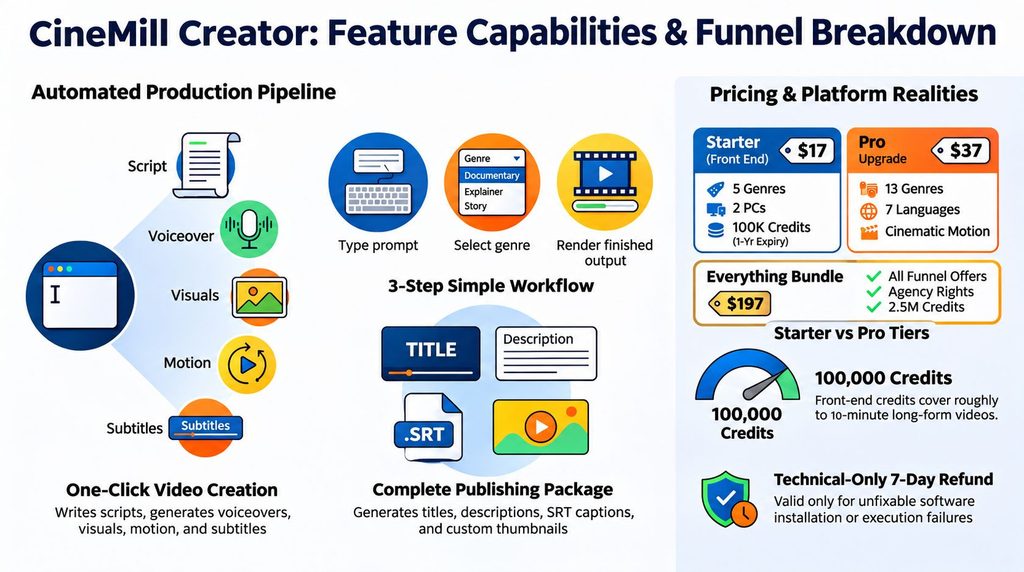
Table of Contents
What Is CineMill Creator and How Does It Work?
It is a desktop app that runs as a small local program and opens its interface in your browser. You type a one-sentence idea, or paste text you already have, such as a story, a news piece or a script. You choose a genre, a voice and a format, and the app writes the script, narrates it, makes a picture for each scene, adds motion, music and subtitles, and then produces a title, description, tags and a thumbnail. Videos can be vertical for Shorts, TikTok and Reels (under a minute) or wide for YouTube (5 to 20 minutes).
The front end includes five genres, each with its own picture style: Mystery, Horror and Scary Stories, Romance, Storytelling, and Kids Moral and Fairy Tales. The Pro upgrade raises that to 13. Voices are US and UK English, with extra languages and dialogue voices in Pro. The page says the same characters stay consistent from the first scene to the last.
How Does CineMill Creator Work? A Step-by-Step Overview
The page describes three steps. First, type an idea, pick a length or paste your own script, or let the AI rewrite a story into a fresh version. Second, pick a genre and a voice, and press Listen to hear the narrator. Third, press Create. The app builds the video, saves it on your computer and gives you the text for your upload. You can preview ten seconds first, and a “Try again” button picks up where a stopped video left off at no cost.
Building takes time. The page says a video takes about its own length plus the time for the pictures, and that you can use your computer for other things meanwhile.
What Do You Get for $17 With CineMill Creator?
According to the sales page and terms, the front end includes the full idea-to-video studio, the five genres, US and UK English voices, wide and vertical formats, title, description, tags and thumbnail, one channel with your own logo, intro and outro, 100,000 AI credits, use on two computers and a one-year support warranty. There are no API keys to buy and no monthly fee for the app itself.
How Do CineMill Creator AI Credits Work?
The built-in AI that writes and plans your videos is paid for with credits. One credit equals one character the AI reads or writes, and the app shows the cost before you press Create. Pictures, voices, “Try again” and making another video from the same script use no credits. Credits are valid for a year from purchase and then expire, and they cannot be transferred.
The page says 100,000 credits cover about ten AI-written ten-minute videos, or many more Shorts. That is plausible. A ten-minute narration is roughly 1,400 to 1,500 words, or about 9,000 characters, plus some scene planning, so the figure is the right order of magnitude. If you paste your own script, you use fewer credits. A Monthly Credits subscription adds 100,000 credits a month for $17, and you can cancel any time.
Where Does CineMill Creator Get Its Images, and Why Does It Matter?
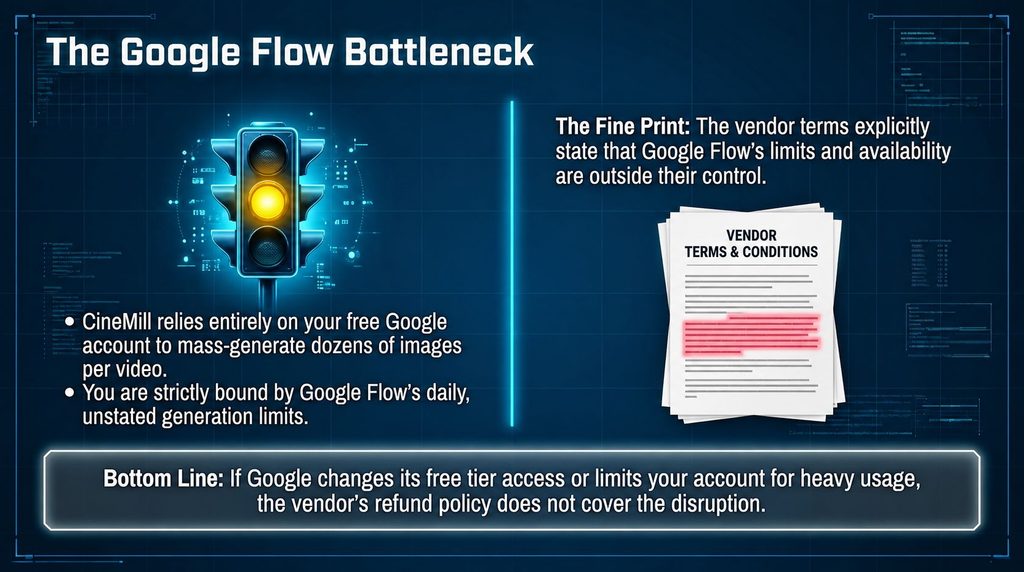
This is the part of the pitch that is easy to miss. The pictures are not made by CineMill’s own engine. According to the sales page and terms, the app opens Google Flow in Chrome, with your own free Google account, and drives it for you. Google’s daily limits apply, and if you hit one, you continue later with one click. That has three consequences. First, you need Chrome and a Google account, and the vendor’s requirements list says so. Second, the number of videos you can make in a day depends on Google’s allowance, not on CineMill.
Google’s own Flow page lists a free tier with 100 starter credits plus 50 credits a day, and a paid Google AI Pro plan with 1,000 monthly credits, and unused credits do not roll over. The vendor does not say how many pictures a free daily allowance covers, so a 20-minute video with dozens of scenes may take more than one day on a free account. Third, because the app operates a web interface, a change by Google could affect it. The vendor’s terms put Google Flow’s limits and changes outside the product and outside the refund policy. Test a full-length video early.

What Data Does CineMill Creator Send From Your Computer?
The sales page says your videos stay on your PC or Mac and nothing is uploaded unless you upload it. That is accurate for the finished videos, and the vendor’s privacy page is refreshingly specific about the rest. Your scripts, pictures, voices and channels are saved locally. The idea or script text that the AI needs is sent through the vendor’s server to a third-party AI provider, and the vendor says its server does not store that text. Picture descriptions go to Google. The app talks to a license server to check your license and credits, about once a week, and must reach it at least once every 60 days. The vendor also keeps your email and purchase details.
The practical advice is simple: do not paste private information into ideas or scripts, and be aware that the app needs an internet connection and an occasional check-in with the vendor’s server.
Does Faceless YouTube Video Creation Really Generate Income?
The CineMill Creator sales page shows two examples of YouTube channels. It lists their subscriber numbers, total views and estimated earnings from Social Blade. The estimates shown are one to three thousand dollars per month for one channel and three hundred thirty‑eight to five thousand four hundred dollars per month for the other channel.
The vendor is clear that these channels are not owned by them. They were not made using CineMill Creator. The channel names are. The earnings come from publicly available estimates. The page also says that these results are not normal which is disclosure.
In the CineMill Creator Make Short & Long Videos in Any Genre Review these examples should be seen as proof that faceless YouTube channels can make money. They are not proof of what a buyer of CineMill Creator can earn. The earnings ranges are estimates, not verified money. The difference between the high estimates is large. The sales page also says that building a channel like this takes effort over many months.
My take: These examples give market context. They should not influence your buying decision as an income promise. CineMill Creator is a tool, for making videos. It does not guarantee views, subscribers, monetization or earnings.
What Does the CineMill Creator License Allow You to Do?
The license is personal, non-exclusive and non-transferable. You do not buy the software itself. One key works on two computers (five with Multiplier Agency or the bundle). Starter and Pro let you make videos for your own channels and earn from them, for example through ads, sponsorships and affiliate links. Making videos for clients needs the Multiplier Agency upgrade, which includes client rights. The DFY Idea Vault ideas are for your own videos and may not be resold.
The Reseller upgrade lets you create 100 Starter license keys per purchase and sell them to your own customers at your own price, keeping all the money. You provide first-line support to those customers, you cannot sell Pro, Multiplier Agency, Idea Vault or Reseller rights, and the terms do not explain how credits attach to resold keys, so ask before planning around it.
CineMill Creator Make Short & Long Videos in Any Genre Review Refund Policy: Important Restrictions to Know
CineMill Creator offers a seven‑day refund window. This window applies only to real technical problems that the support team cannot fix. Buyers must first contact support give the requested details. Let the vendor try to fix the problem. Every product, every upgrade and every monthly payment has its separate seven‑day refund period. Changing your mind failing to meet the system requirements, limits or changes in Google Flow usage, decisions by YouTube or other platforms and purchases where most credits have already been used are not eligible for a refund.
Separately every purchase comes with a support warranty. If something stops working buyers can email the vendor for help until the problem is solved.. This support promise should not be mixed with a money‑back guarantee. For this CineMill Creator Make Short & Long Videos in Any Genre Review the strict refund terms are worth thinking about before buying. Seven days is a test time, for software that relies on Google Flow. My suggestion is to test the installation and make least one full long‑form video within the first few days instead of waiting until the refund window is almost finished.

CineMill Creator Make Short & Long Videos in Any Genre Review Pricing Funnel: Understanding All the Upgrades
The sales page names every upgrade and the monthly credits plan, shows the bundle price and what is in it, and the WarriorPlus dashboard matches the vendor’s partner page on every name and price. Here is the funnel, with what each offer adds according to the vendor.
| Offer | Price | What the vendor says it adds |
|---|---|---|
| CineMill Creator (front end) | $17 | The full studio, 5 genres, 100,000 credits, 2 computers |
| Pro | $37 | All 13 genres, 7 languages, dialogue voices, cinematic motion, +200,000 credits |
| Multiplier Agency | $47 | Shorts Multiplier, Batch Shorts, client rights, unlimited channels, 5 computers, +200,000 credits |
| DFY Idea Vault | $27 | 780 ready-made video ideas across the 13 genres |
| Reseller | $147 | 100 Starter license keys to sell, keep 100%, +2,000,000 credits |
| Monthly Credits | $17 a month | 100,000 more credits every month, cancel any time |
| Everything Bundle | $197 | Everything above except Monthly Credits, with 2,500,000 credits |
Ready to Create Your Own Faceless Videos?
Explore CineMill Creator and discover a simpler way to create short and long-form videos across multiple genres. Get started with the $17 launch offer and access our exclusive bonus package worth $1,000+.
Check the official offer page for current pricing, features and terms.
I see that the CineMill Creator Everything Bundle offers a price benefit. The front end, Multiplier Agency, DFY Idea Vault and Reseller each cost $275 when purchased separately.. The CineMill Creator Everything Bundle is just $197 saving $78. It also includes a total of 2,500,000 AI credits. Monthly Credits are sold separately. Buyers of the CineMill Creator Everything Bundle do not get the individual upgrade offers. Each monthly payment, from the CineMill Creator Everything Bundle comes with a seven-day refund period.
In my experience the smart way to use the CineMill Creator Make Short & Long Videos in Any Genre Review is to start with the $17 end. I. Review one full long-form video first. Then I decide if any upgrades are really necessary. This approach keeps me from spending money before I know how much I will use and how credits I need.
What I Liked About CineMill Creator
An honest “what it needs” list. The vendor tells you about Chrome, a Google account, about 5 GB of space and Google’s daily limits.
Unusually clear paperwork. The terms, refund policy and privacy page are specific, dated 29 October 2026 and consistent with the sales page.
A funnel that checks out. Every upgrade is named on the sales page, the bundle and credit arithmetic is exact, and the dashboard matches the partner page.
No API keys and no monthly fee for the app, and credits that are counted in a way you can follow.
Careful income language, with disclaimers attached right beside the faceless-channel numbers.
A one-year support warranty alongside the refund policy.
CineMill Creator Make Short & Long Videos in Any Genre Review Pricing: Which Plan Offers the Best Value?
If you only want to try the software you can start with the $17 CineMill Creator app and a free Google account.
First make one full long‑form video before thinking about any upgrades.
If you want genres, more languages or more voice options the $37 CineMill Creator Pro upgrade gives you those features.
If you need to create videos for clients the $47 CineMill Creator Multiplier Agency upgrade adds client rights.
Heavy users should look at the $17 monthly credits plan. Compare it to how many videos they actually produce.
If you want to resell licenses check how AI credits are split among keys before buying the $147 CineMill Creator Reseller offer.
In this CineMill Creator Make Short & Long Videos, in Any Genre review my advice is to start with the $17 front‑end plan and only upgrade when a clear limitation makes the extra cost worthwhile.
Who Should Buy CineMill Creator?
You want to try faceless story videos without recording or editing, you are comfortable with Chrome and a Google account, you will add your own ideas rather than posting identical videos, and you treat $17 as a low-cost test. Official page
You expect income without consistent work, you do not want to depend on Google Flow’s limits, you need a long refund window, or you plan to mass-produce near-identical videos for monetization.
CineMill Creator Make Short & Long Videos in Any Genre Review Value and ROI: Is the $17 Investment Worth It?
The money risk of using CineMill Creator at $17 is small. The real cost is your time the limits of your Google account and any extra credits you may have to buy. In this CineMill Creator Make Short & Long Videos, in Any Genre Review you should know that CineMill Creator says it will not give you any views, subscribers or money. None are promised. Building a faceless channel still needs steady work, fresh ideas and following YouTubes rules for making money. No app can remove those needs. Check each upgrade carefully. Buy it only when you see a clear problem CineMill Creator fixes.
Ready to Create Your Own Faceless Videos?
Explore CineMill Creator and discover a simpler way to create short and long-form videos across multiple genres. Get started with the $17 launch offer and access our exclusive bonus package worth $1,000+.
Check the official offer page for current pricing, features and terms.
CineMill Creator Make Short & Long Videos in Any Genre Review: FAQs
What is CineMill Creator?
A Windows and Mac app that turns an idea or pasted text into a finished faceless video with script, voice, pictures, motion, subtitles, title, description and thumbnail.
How much does it cost?
$17 one-time at launch. Upgrades run from $27 to $147, Monthly Credits are $17 a month and an Everything Bundle is $197.
Do I need API keys or other AI subscriptions?
No. The script AI is built in and paid with included credits. You do need Chrome and a Google account for the pictures.
Where do the pictures come from?
From Google Flow, which the app opens and drives in Chrome with your own Google account. Google’s daily limits apply.
How many videos does 100,000 credits make?
The vendor says about ten AI-written ten-minute videos, or many more Shorts. One credit is one character.
Can I make money on YouTube with it?
The videos are yours to publish, but YouTube decides what it monetizes. Its policy targets mass-produced, repetitive content, so add original value and follow its disclosure rules.
Can I make videos for clients?
Only with the Multiplier Agency upgrade, which adds client rights.
What is the refund policy?
Seven days, for a technical problem support cannot fix, after contacting support first. A separate one-year support warranty covers fixes and help.
Is this review based on hands-on testing?
No. It is based on the vendor’s pages, the WarriorPlus dashboard and public information about Google Flow and YouTube. The app was not run.