
Every launch season brings a new tool that promises to fix the one part of publishing a product that nobody enjoys: the sales page. This PageCraft AI review exists because that promise gets made constantly, and it’s rarely true in the way the sales page says it is. So instead of rewriting the pitch, this article pulled the actual sales page in full, read every claim on it, checked what could be checked, and flagged what couldn’t. There’s no funnel breakdown table here comparing six OTOs — because there aren’t six OTOs. There’s one product, sold at a price that climbs while the launch runs. That alone is worth knowing before you click anything.
🏆 Quick Verdict
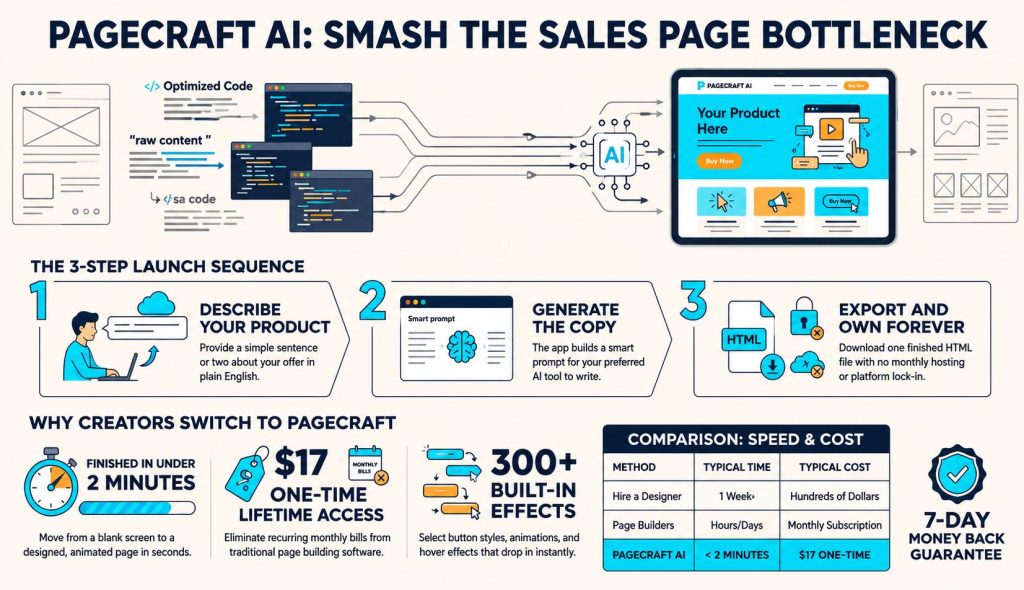
PageCraft AI is a browser-based tool that converts your sales copy into a responsive HTML landing page without coding. It focuses on speeding up page creation rather than writing copy or hosting websites. With a launch price starting at $17 and increasing later, it’s an affordable option for marketers who want faster page publishing.
🚀 Check Current PriceTable of Contents
Quick Note: Which “PageCraft” Is This?
Before proceeding, it’s important to address a frequent point of confusion in this PageCraft AI Review, as multiple unrelated products sometimes show up for the same search term. This review examines the WarriorPlus offer developed by Abdelhay Bel at mypublishinghub.coma browser-based tool that transforms AI-generated or pre-existing sales copy into animated, responsive HTML landing pages. It differs from PageCrafter AI, the Shopify app for generating product descriptions, and also from the Shopify landing-page builder that shares a similar name. It is also unrelated to the PageCraft custom GPT designed for fiction writers or pagecraft.ca, a distinct blog publishing platform.
This distinction matters because each of these tools targets a completely different audience. Some tools concentrate on eCommerce product listings, others on long-form content or blogging, but the version featured in this PageCraft AI Review is tailored for marketers, affiliates, coaches, and digital product sellers aiming to design polished sales pages without needing to write any code. Its main objective is to accelerate the conversion of written sales copy into a responsive HTML page ready for publication anywhere.
If you’re here seeking reviews of other PageCraft-branded products, this article won’t address those queries. However, if you ’re researching the WarriorPlus launch to determine whether it’s worth purchasing, this PageCraft AI Review will guide you through its features, workflow, pricing, included bonuses, strengths, limitations, and overall valuehelping you make an informed buying decision before spending your money.
What PageCraft AI Actually Does
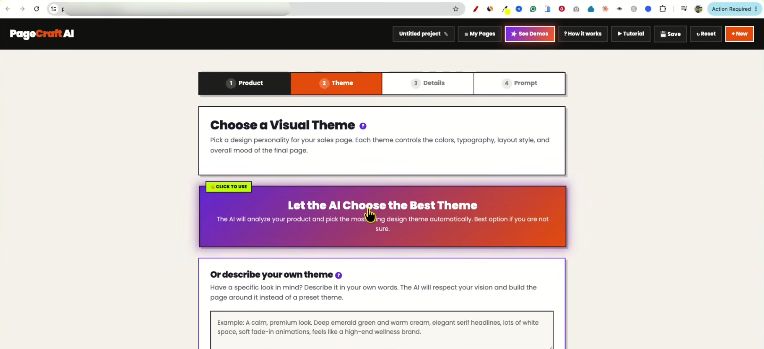
As outlined throughout this PageCraft AI Review, the fundamental workflow is straightforward and practical. You can either paste pre-written sales copy or briefly describe your product in a few sentences, and PageCraft will create a structured prompt tailored for your chosen AI chat tool. The sales page lists ChatGPT, Claude, Gemini, and DeepSeek, and this step doesn’t need a paid subscription. After the AI generates the copy, you simply paste it back into PageCraft, which then automatically integrates it into a professionally designed, animated HTML template featuring responsive layouts, pre-set sections, buttons, and formatting.
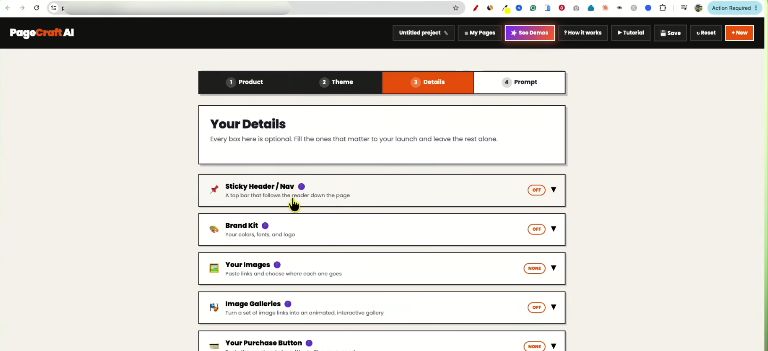
You can then instantly change themes, edit text or images, insert custom HTML like payment buttons or tracking scripts, and export the completed page as a single HTML file ready for hosting anywhere. This streamlined workflow stands out as one of the key strengths noted in this PageCraft AI Review, particularly for creators aiming to publish landing pages rapidly.
Another important insight from this PageCraft AI Review is that the platform has a highly specific objective. It’s not a complete website builder, hosting service, or AI copywriter that generates offers from scratch. Rather, it connects AI-generated content with a refined, ready-to -publish sales page. If you already use AI tools for writing, PageCraft takes over most of the manual design tasks needed to transform plain text into a polished landing page. This makes it especially valuable for marketers, affiliates, coaches, freelancers, and digital product creators who want to speed up offer launches while keeping a clean, conversion-driven look.
Who’s Behind It: Creator Track Record
PageCraft AI Review – Creator Track Record
Abdelhay Bel presents himself on the sales page as a solo software creator rather than a traditional marketing vendor. According to the sales page, he built PageCraft AI to solve a workflow bottleneck he encountered while launching two earlier products of his own, including a masterclass and a course called Interactive Worksheet Creators. The page also claims the application was tested across roughly 200 different products before this public release. During research for this PageCraft AI Review, another product titled Instant AI Program Masterclass appeared to be associated with the same creator, although that connection could not be independently verified beyond promotional material.
From the perspective of this PageCraft AI Review, the most encouraging aspect isn’t the creator’s biography—it’s the specificity of the problem the software claims to solve. Rather than relying on broad AI marketing promises, the sales page focuses on replacing the repetitive cycle of copying content between AI chat tools and traditional page builders. Whether that workflow originated from the creator’s personal experience or is simply a marketing narrative can’t be verified independently, but the product’s positioning is noticeably more focused than many typical WarriorPlus launches.
🚀 Ready to Build Your First AI Sales Page?
If PageCraft AI fits your workflow, grab it at the current launch price before it increases. The one-time purchase includes the AI page builder, bonus resources, and HTML export with no monthly subscription.
👉 Get PageCraft AI NowThere’s No OTO Funnel — Here’s What That Actually Means
As noted in this PageCraft AI Review, the pricing is much simpler than most WarriorPlus launches. Instead of multiple OTOs and upsells, the sales page offers a single product with one buy button, although the price increases over time. All bonuses—including the deployment guide, AI theme prompts, effects picker, SalesForge AI, commercial rights certificate, and 10 days of extra themes—are bundled into the front-end purchase rather than sold separately.
This straightforward approach means there are no surprise upsells after checkout, making it easier to know exactly what you’re getting. However, this PageCraft AI Review also recommends paying attention to the “time-limited bonus” labels, especially for items like SalesForge AI, since these extras could be removed or become paid upgrades in future promotions.
The Price Ladder, Laid Out Plainly
Because this article is being published mid-launch, the price you’d actually pay depends entirely on when you click through — so here’s the ladder as stated on the sales page, without editorializing about urgency.
| Window | Price |
|---|---|
| First 24 hours | $17 |
| Following two days | $19 |
| Rest of launch week | $27 |
| After launch closes | $47 |
These figures are stated by the vendor on the live sales page as of the fetch date for this review and could not be cross-checked against a launch calendar or third-party listing, since none was found. Confirm the current price at checkout before publishing this review, since a mid-launch pricing table is the single fastest thing on this page to go stale.
What You’re Actually Getting for That Price
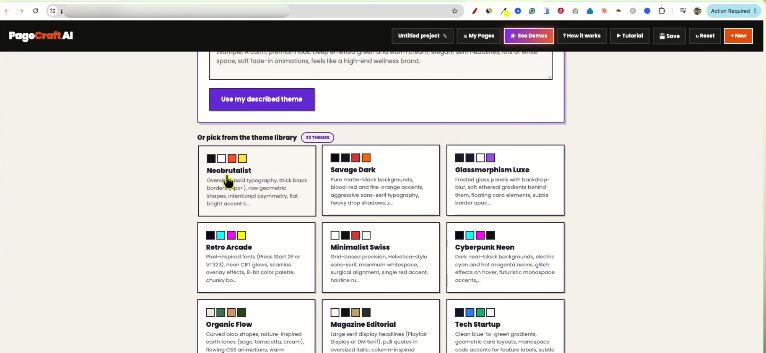
In this PageCraft AI Review, the main features of the product encompass the AI copy-to-page builder, theme library, effects picker, and one-click HTML export. The included bonuses are intended to enhance its functionality rather than substitute for it. These extras consist of a free PDF guide on HTML hosting, reusable AI prompt libraries for creating extra themes, and an effects picker that lets you apply button styles, hover effects, and animations using just one prompt. The package also comes with a time-limited commercial rights certificate, so it’s important to review the exact licensing terms before you plan to resell or repackage any pages you create.
What’s not included, and this matters for setting expectations correctly in this PageCraft AI review: there’s no hosting provided, no domain, no built-in payment processing, and no copywriting engine that works without you either supplying copy or describing your product first. You still need a place to put the exported file, and you still need an actual offer worth writing a sales page for. This is a production-speed tool, not a business-in-a-box — a distinction that applies to nearly every tool in this software category and is worth repeating rather than assuming readers already know it.
How It Works, Step by Step
The workflow outlined in this PageCraft AI Review consists of four simple steps. Step one: Write a brief description of your product in one or two sentences, or paste any existing copy you’ve already created. Step two: If you begin with a description, PageCraft generates a structured prompt based on its established copywriting frameworks, which you then input into your preferred AI chat tool in a different browser tab. Step three: paste the AI-generated output back into PageCraft, where it will be automatically integrated into your selected theme, complete with a refined design and animations.
The sales page states that this page-building stage can be finished in less than two minutes. Step four: personalize the result by modifying themes, adjusting text, reordering sections, inserting a payment link or custom HTML, and then save the finished landing page as one HTML file. This streamlined workflow is one of the main features discussed in this PageCraft AI Review.
Another key point emphasized in this PageCraft AI Review is the gap between the marketing claim and the actual workflow. The ” under two minutes” claim in the advertisement refers solely to the page assembly phase, not the full content creation process. Creating or improving your sales copy can take anywhere from a few seconds, if you ’re reusing existing material, to several AI interactions if you ’re beginning from scratch. Therefore, your total production time largely depends on the quality of your original product description and the extent of refinement required.
Finally, this PageCraft AI Review also points out that the platform depends on an external AI chat tool to create the actual sales copy. Therefore, the quality of your final landing page largely hinges on the AI model you select and how clearly you present the information. PageCraft’s primary benefit is in generating a more robust and well-organized prompt using established copywriting frameworks, rather than promising flawless output no matter the input. For those already using AI writing tools, this method can speed up page creation, improve consistency, and simplify management.
Pros and Cons
✅ What’s Genuinely Good
- No OTO funnel — one price, everything bundled, with no upsell screens.
- Works with the free tiers of ChatGPT, Claude, Gemini, and DeepSeek, so a paid AI subscription isn’t required.
- Exports a single portable HTML file that you own and can host anywhere.
- Includes a 7-day refund window with a stated fix-first support process.
- The narrowly defined focus (sales pages rather than full websites) helps set realistic expectations.
⚠️ Where To Be Careful
- There are currently no independent reviews or buyer feedback; claims come from the vendor.
- No commission or JV information is available for this offer.
- The launch price increases from $17 to $47, so purchase timing matters.
- One bundled bonus (“SalesForge AI”) is described as time-limited, so availability may change.
- You still need to provide the product description or sales copy—the software doesn’t invent your offer.
Buy It If / Skip It
✅ Buy It If
- You already have sales copy sitting unused or can comfortably write your own product descriptions.
- You’ve experienced the gap between AI-generated copy and having a polished, publishable sales page.
- You’re comfortable buying a newly launched tool before extensive independent reviews appear.
- You want a portable single-file HTML page that you can host anywhere without platform lock-in.
❌ Skip It If
- You prefer software with a proven track record and established buyer feedback.
- You need a complete multi-page website builder rather than a single landing or sales page.
- You don’t yet have a product or offer—the tool won’t create one from scratch.
- You’d rather wait for more independent reviews before making a purchase, even at the introductory price.
🚀 Ready to Build Your First AI Sales Page?
If PageCraft AI fits your workflow, grab it at the current launch price before it increases. The one-time purchase includes the AI page builder, bonus resources, and HTML export with no monthly subscription.
👉 Get PageCraft AI Now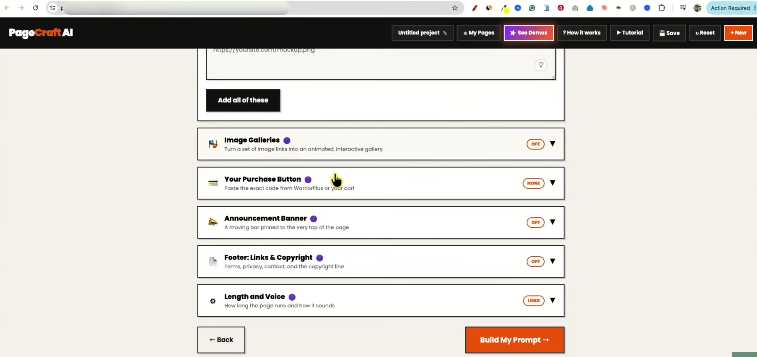
Frequently Asked Questions
No, per the sales page — the free tiers of ChatGPT, Claude, Gemini, or DeepSeek are described as sufficient for the copywriting step. PageCraft itself is the one-time purchase; the AI tool you pair it with is your own separate choice and cost if you choose a paid tier.
No. It’s presented as a one-time payment at whatever price tier is live when you buy, with no recurring fee described anywhere on the page.
No for normal use — the sales page states the interface is meant for non-technical users, with raw HTML editing available only if you choose to use it. That claim couldn’t be independently verified without hands-on testing.
No. It exports a single HTML file that you host yourself; a bundled guide covers free hosting options, but PageCraft is not itself a host.
Not from nothing. You still need to describe your product or supply existing copy — the app’s job starts after that point, generating a prompt and then a page, not inventing your offer.
None are described on the sales page. This appears to be a single-purchase product rather than a multi-step OTO funnel, based on everything available to check at the time of writing.
Per the sales page, it rises through $17, $19, and $27 during launch week before settling at $47 afterward — confirm the live price at checkout since this article can’t guarantee which window you’re reading it in.
Yes — a 7-day guarantee is stated, with the vendor asking buyers to email support first so issues can be fixed before a refund is processed. The sales page is explicit that refunds don’t apply to complaints about things the product never claimed to do (hosting, product creation, or full website building) — worth reading before assuming a no-questions-asked policy.