
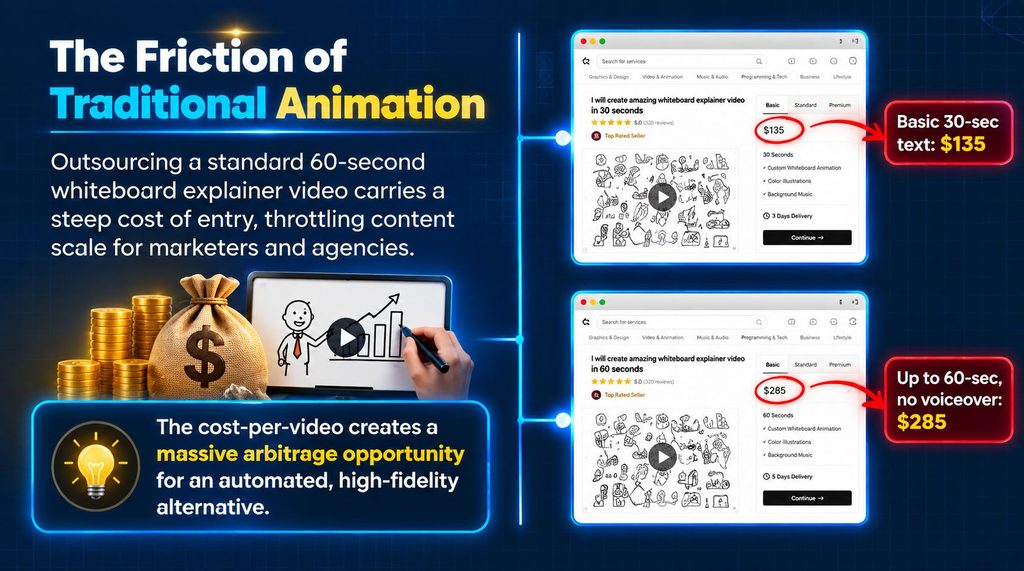
If you want to create whiteboard explainer videos without spending hours drawing scenes manually Skribbly Video Maker takes a different approach. This browser-based tool turns a topic into a hand-drawn video with an AI-written script, realistic hand animations, custom illustrations, voice narration and optional captions. In this Skribbly Video Maker Review we will look at how it works the real AI usage costs, what you get for the $17 entry price, the refund and licensing terms and whether it makes sense for your video creation needs.. You can get a bonus package worth $1,000+ when you access the offer through our link.
Skribbly turns a typed topic into a hand-drawn whiteboard explainer video. It uses an AI-generated script, shows a hand drawing each scene, lets you pick a voice, adds optional captions, and delivers a finished 1080p MP4 file. The sales page backs up these claims with sample videos that are embedded directly—no fake screenshots or vague marketing talk. What stands out is how open the sales page is about costs beyond the price you pay. It gives a breakdown of what it spends on Anthropic, OpenAI, and voice providers.
That makes it easier to see what the real cost might be before you buy. There’s also a 30-day refund policy—no tricks, no fine print. One issue: there was no working JV page for this review. The link provided led to a completely different product. So instead, the funnel was mapped using the sales page’s bundle prices and information from third-party reviews. These checks lined up well. Even the Captionly listing, which seemed odd at first, turned out to be a genuine product from the same creator.
Get Skribbly Video Maker + $1,000+ Bonus
Create engaging hand-drawn whiteboard videos with Skribbly Video Maker and get access through our special bonus link.
Get Skribbly + $1,000+ BonusCheck the offer details and bonus availability before purchasing.
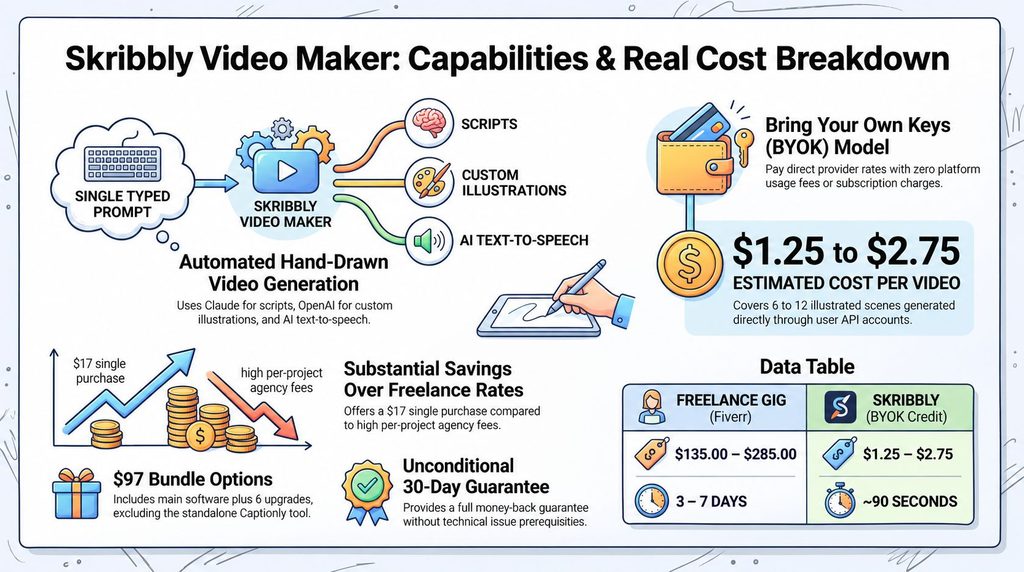
Table of Contents
Skribbly Video Maker Review: Quick Summary
- Product: Skribbly Video Maker — browser-based software that turns a typed topic into a hand-drawn whiteboard explainer video.
- Creator: Stephanie Hayes (Stephanie Hayes Marketing) — independently confirmed via third-party coverage, with one prior named product (Captionly).
- Launch: September 30, 2026, 10:00 AM EST — 4 days live as of this review.
- Front-End Price: $17.
- Format: Chrome-only browser app; bring-your-own-keys (Anthropic, OpenAI, and a voice provider), with no subscription to the tool itself.
- Real Cost Per Video: Roughly $1.25–$2.75 in AI provider credit, itemized directly on the sales page.
- Refund Policy: A genuinely unconditional 30-day, no-questions-asked guarantee.
- License: Personal use, including client work; 2 devices per key; no resale or redistribution of the tool.
- Funnel Note: No valid JV page was available. The supplied link was for an unrelated product; the funnel was mapped from the sales page’s own bundle description and verified independently.
- Get It Here: Skribbly Video Maker
What Does Skribbly Video Maker Actually Do?
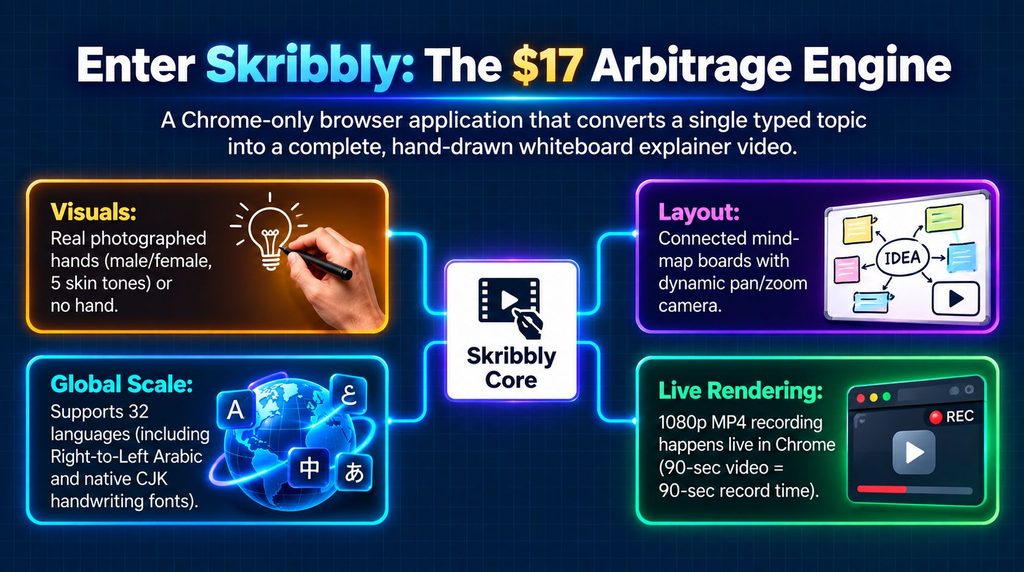
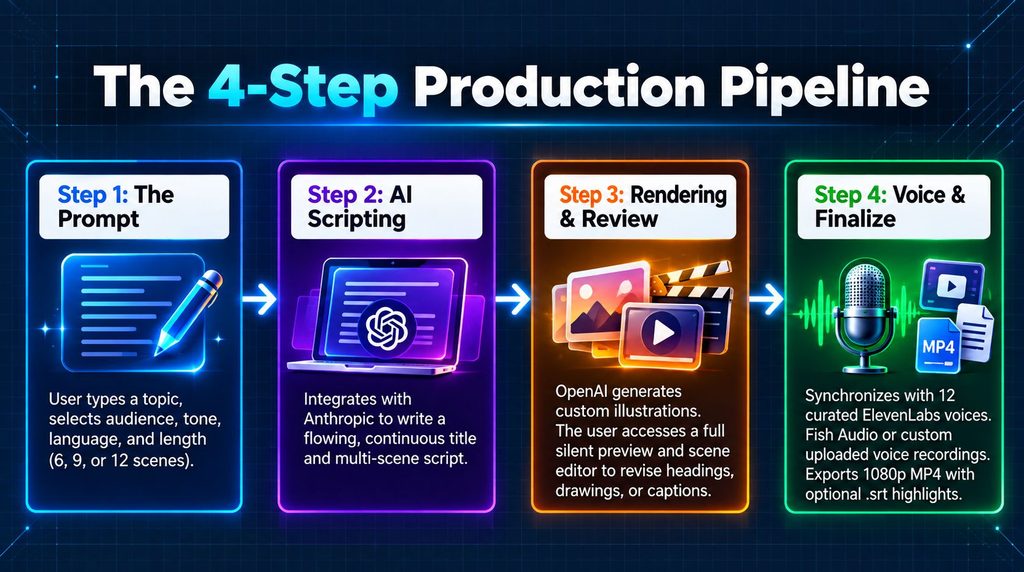
Confirmed directly from the sales page. Supported by embedded sample videos, Skribbly Video Maker takes a typed topic and turns it into a hand-drawn whiteboard explainer. You can add an audience, a tone and a language then choose between 6, 9 or 12 scenes. The software uses your Claude API key to generate a title scene followed by individual scenes for each point creating one continuous explanation instead of a disconnected collection of slides.
The visual style is based around a photographed hand with female and male options, five skin tones or the option to remove the hand completely. The hand writes headings letter by letter while custom AI-generated illustrations are created through your OpenAI API key. For narration you can choose from 12 curated ElevenLabs voices use Fish Audio or upload your recording. Of showing each scene as a separate slide Skribbly arranges them on a connected mind-map-style board.
The camera moves from one scene to the next as the hand draws zooms out to show the complete board at the end giving the finished video a more connected explainer feel. Before making the video you can watch a silent preview and edit individual scenes. Once the content is ready Skribbly creates a voiced 1080p MP4, with word-highlight captions and a matching .srt subtitle file.
The recording takes place live, in Google Chrome. The sales page says that a 90-second video takes 90 seconds to record but the browser tab must stay open and in the foreground during the recording. This makes the workflow simple. It is important to remember that the tool relies on the users browser, API accounts and AI-provider credits.
Skribbly Video Maker Real Running Costs: What You’ll Actually Pay
I find interesting because it uses a 100 percent bring-your-own-keys model. This means that the $17 purchase price does not cover the AI usage needed to make videos. Some AI tools hide costs in a short note but the Skribbly sales page gives a clear and detailed cost breakdown. For illustrations you pay $1.25 for a 6‑scene video, $2.00 for nine scenes and $2.75 for twelve scenes. Script creation with Claude costs than $0.10. Voice creation depends on the provider’s per‑character rate.
You can skip the voice cost if you upload your own recording. The Skribbly sales page is clear about payment responsibilities. It says, “I never charge you for usage. You pay your AI providers directly.” It also says that Skribbly does not collect a subscription fee or any usage fee.
Transparency is important because the headline price does not show the cost of making a video. You must have your AI provider accounts and plan, for those usage charges separately. Remember that AI usage is a cost you must budget for. By giving real per‑video estimates Skribbly makes it much easier to see the cost before buying.
Skribbly Video Maker Funnel: JV Page, Pricing & Bundle Math
The Google Doc that was supposed to be the JV page for this launch opened to a different product—“Bible Study Workbooks w/ Unrestricted PLR.” That doesn’t make sense. It looks like someone just copied and pasted the file. So no actual Skribbly content was used from that document. Since there was no working JV page I checked the sales page instead. On the sales page there’s a section called Skribbly Bundle.
That section lists six of the nine upgrades by name: Theme & Font Pack, Skribbly Reels, Skribbly X vs Y, Skribbly Listicles, Retention Scripter and Publish Kit. It also says the bundle should normally be worth $123.80 but it’s being offered for $97. Now if you add the front-end price of $17 to those six items it comes out to $123.80. That matches the number on the sales page. That’s a sign that the six upgrades are correctly identified and included in the bundle. There’s one thing that stands out. Captionly, priced at $47 isn’t listed in the bundle on the sales page.
Skribbly Video Maker Refund Policy & License Terms
The refund policy is very wide-ranging and not for technical issues. The sales page says: “Make a whiteboard videos and see how good they look. If its not for you contact us within 30 days for a refund. No questions asked.” This gives people a 30-day time period to try the software without needing to prove there is a technical problem. The licensing terms are also very important to know.
According to the Terms & Conditions buying the software gives a license that allows the buyer to use it for their own marketing, content creation and work with clients. Each license key can be used on up to two devices. The license does not let buyers resell or share the Skribbly software. People cannot sell, share or distribute the Skribbly software unless they get written permission. In words this is a license, for using the software, not a PLR, white-label or resale-rights product.
Who Is Stephanie Hayes? Skribbly Video Maker Creator
About the Creator: Stephanie Hayes
A third‑party report from BigToolsLab released after Skribbly launched says that Stephanie Hayes of Stephanie Hayes Marketing made this product. The report also says that Captionly, a moving caption video tool was one of Stephanie Hayes projects. That tool can be seen as the same Captionly offer that is sold as an add‑on in the Skribbly sales funnel. There is also proof that the businesss real and not just on the Skribbly page.
The company’s website has a privacy policy that’s about two and a half years old which shows that the business existed before this launch. In this Skribbly Video Maker Review the key fact is that the identity of Stephanie Hayes and the history of her products are not taken from the sales page. Independent coverage confirms that Stephanie Hayes is the creator and links Captionly to her work. Overall, Stephanie Hayes is an smaller seller compared to some of the other creators mentioned in this review series. Still the evidence we have is not, from the Skribbly page.
Get Skribbly Video Maker + $1,000+ Bonus
Create engaging hand-drawn whiteboard videos with Skribbly Video Maker and get access through our special bonus link.
Get Skribbly + $1,000+ BonusCheck the offer details and bonus availability before purchasing.
Skribbly Video Maker Pricing & Funnel: Live Dashboard vs Sales Page
| Listing | Price |
|---|---|
| FE — Skribbly (full 16:9 whiteboard studio) | $17.00 |
| Bump — Skribbly Publish Kit (titles, descriptions, FAQ, schema) | $9.95 |
| OTO — Skribbly Theme & Font Pack (more boards, fonts, hands, colours) | $12.95 |
| OTO — Skribbly Reels (9:16 vertical for TikTok/Shorts/Reels) | $17.00 |
| OTO — Skribbly Retention Scripter (scripts written to hold attention) | $17.00 |
| OTO — Skribbly Listicles (top-5/best-of countdown videos) | $24.95 |
| OTO — Skribbly X vs Y (side-by-side comparison videos) | $24.95 |
| OTO — Captionly (a separate, prior kinetic-captions video tool) | $47.00 |
| Bundle — Skribbly Bundle (FE + all Skribbly upgrades, NOT Captionly) | $97.00 |
Skribbly Video Maker Cost: Realistic Budget Scenarios
The full 16:9 whiteboard studio, plus roughly $1.25-$2.75 in AI provider credit per video you make.
Everything Skribbly makes (16:9 and 9:16, every board/font/hand), $26.80 cheaper than buying the 6 upgrades separately.
Adds the separate kinetic-captions tool from the same creator’s prior launch, on top of the full Skribbly bundle.
Skribbly Video Maker Review: Buy It If / Skip It If
You want genuinely good-looking whiteboard explainer videos without hiring an animator or learning VideoScribe/Doodly, you’re comfortable setting up and funding your own Anthropic, OpenAI, and voice-provider accounts, and you value an honest, itemized cost breakdown and a real no-questions refund.
You want a tool with zero external accounts to manage, you’re not using Chrome on desktop (required, since recording runs live in-browser), or a long, multi-year vendor track record matters more to you than a newer creator with one independently-confirmed prior product.
Skribbly Video Maker Pre-Purchase Checklist
- Set up Anthropic (Claude), OpenAI, and an ElevenLabs or Fish Audio account (or plan to upload your own voice recording) before buying.
- Confirm you’re using Google Chrome on desktop — recording runs live in-browser and requires the tab to stay open and in front.
- Budget roughly $1.25–$2.75 in AI provider credit per video, on top of the one-time $17–$97 purchase.
- Decide whether the full Bundle ($97) or individual upgrades fit your actual use case before buying further up the funnel.
- Treat Captionly as a separate, standalone tool from the same creator’s prior launch, not part of the core Skribbly bundle when evaluating this Skribbly Video Maker Review.
Skribbly Video Maker Review FAQs
What does it actually cost to make a video, beyond the purchase price?
Confirmed directly on the sales page: about $1.25 in OpenAI credit for a 6-scene video, $2.00 for 9 scenes, and $2.75 for 12 scenes, plus under 10 cents for the script and your voice provider’s per-character rate (or free if you upload your own recording).
Is there a refund policy?
Yes — a genuinely unconditional 30-day guarantee, stated plainly on the sales page: if it’s not for you, request a refund within 30 days, no questions asked.
What is “Captionly” doing in this funnel?
It’s a separate, earlier product from the same creator — a kinetic caption video tool — confirmed by independent third-party coverage, being offered again here as its own standalone upgrade. It is not part of the Skribbly Bundle.
Can I resell videos I make, or resell the tool itself?
You can use Skribbly for your own marketing, content, and client work under a personal license covering 2 devices. Reselling, redistributing, or sharing the tool itself is not permitted without written permission, per the Terms & Conditions.
Is Stephanie Hayes an established vendor?
Independent third-party coverage confirms her as the creator and names a specific prior launch (Captionly), which is independently verifiable as the same product appearing in this funnel — a smaller but genuine, corroborated track record rather than a long multi-year history.
Get Skribbly Video Maker + $1,000+ Bonus
Create engaging hand-drawn whiteboard videos with Skribbly Video Maker and get access through our special bonus link.
Get Skribbly + $1,000+ BonusCheck the offer details and bonus availability before purchasing.
Skribbly Video Maker Review: Final Verdict
Skribbly is one of the clearly explained tools that I have looked at in this series of reviews. The sales page shows real sample videos that are embedded and available in languages. It also lists the costs for the AI provider that are not included in the purchase price. Skribbly gives an unconditional 30‑day refund and it has clear licensing rules. The biggest problem is not with Skribbly itself but with the process. I could not find a JV page for this review so I had to rebuild the funnel using Skribbly’s own bundle prices and information from other sites.
Those checks matched each other and even the unclear Captionly listing turned out to be an earlier product made by the same creator. If you want to make whiteboard explainer videos without hiring an animator Skribbly gives a $17 starting price. The main thing to think about is that you need to set up your AI provider account and pay the small usage fees on your own. In short this Skribbly Video Maker Review says that Skribbly is honest, about what the software can do how much it will cost and what you will get when you buy it.